
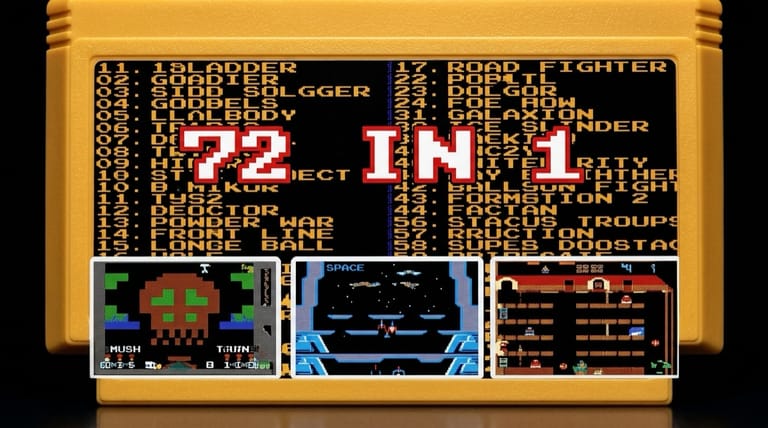

72 in 1
Loading game…
72 in 1
One cartridge, seventy-two games. The 72-in-1 is a classic early-90s NES multicart — a single collection packing dozens of retro titles behind one menu — and the entire cartridge image runs on this page at no charge, selection menu and all, with nothing to install. Browse the list, pick a game, and jump straight into the action. Hit the Play button to load the menu, and read on for what's inside, how the controls work, and tips for getting the most out of it.
What Is the 72-in-1?
The 72-in-1 is a multicart — a single cartridge that bundles many games together — made by Supervision in the early 1990s. Around 1 MB in size, it contains 72 selectable entries: roughly 53 original games plus 19 modified or remixed versions of them (the real game names are typically shown in brackets on the menu).
Multicarts like this were hugely popular in the cartridge era as an affordable way to get a whole library in one place. Instead of swapping carts, you'd boot up, scroll a menu, and pick whatever you felt like playing — arcade-style action, puzzlers, shooters, and platformers all in a single collection.
How It Works
The 72-in-1 opens to a selection menu listing all the included games, usually numbered. You navigate the list, highlight the title you want, and launch it. When you're done — or when a game ends — you can return to the menu and pick another. It's a pick-up-and-play sampler: great for short sessions, quick nostalgia hits, and discovering titles you might not have tried otherwise.
Because the collection mixes original games with modified variants, you'll sometimes find altered versions of familiar titles — different starting conditions, tweaked difficulty, or remixed graphics — listed alongside the originals. That blend is part of the multicart's charm: it's not just a library, it's a grab bag where a familiar game might surprise you with a fresh twist.
Carts like the 72-in-1 were especially common as unlicensed compilations, sold as an inexpensive way to pack a huge amount of play into a single purchase. For collectors and retro fans today, they're a fascinating snapshot of how games were bundled and shared in that era — a single menu standing in for a whole shelf of cartridges.
How to Play
Getting started is instant. Press the Play button on this page and the multicart powers up on its selection menu rather than any single game. Then:
- Wait for the game-select menu to appear.
- Use the D-pad to move up and down the list of titles.
- Press Start (or the confirm button) to launch the highlighted game.
- Play using the standard NES controls for that game.
- Reset or return to the menu to pick another title when you're ready.
Input is handled either way. The keyboard layout below drives the menu and every game behind it, a connected USB or Bluetooth gamepad is picked up automatically, and on a touchscreen an NES-shaped pad is drawn over the game with the D-pad and the two face buttons the collection actually uses.
Controls
Exact in-game controls vary by title, but the menu and standard NES buttons are below:
| Action | Control |
|---|---|
| Navigate Menu / Move | Arrow Keys |
| Confirm / Action A | Z (A) |
| Action B | X (B) |
| Select | V (Select) |
| Start / Launch / Pause | Enter (Start) |
Most games in the collection use the D-pad plus the A and B buttons. Plug in a gamepad and it picks up the same layout, which makes scrolling a 72-entry menu quicker than tapping arrow keys.
Tips for Getting the Most Out of It
- Explore the whole list. With 72 entries, there's a good mix of genres — scroll through and sample a few you don't recognize.
- Note the bracketed names. The menu often shows the real title of each game in brackets, which helps you find a specific favorite.
- Try the modified versions. The remixed entries can offer a fresh twist on games you already know.
- Use it for short sessions. A multicart is perfect when you want quick arcade-style fun without committing to one long game.
- Return to the menu anytime. If a game isn't grabbing you, jump back and pick another — that's the whole point of the collection.
Why Play It in Your Browser?
The 72-in-1 is a slice of cartridge-era history — a whole library of retro fun in a single package. Tracking down a physical copy today means trawling market stalls and auction listings for an unlicensed cart that may or may not still boot; here the menu is one click away. Because it's the genuine NES multicart, you get the original selection menu and the full lineup of games exactly as the collection shipped.
Frequently Asked Questions
Is the 72-in-1 free to play here? Yes. All 72 entries come off the same cartridge image and none of them is held back — no charge, no sign-up, nothing written to your machine.
What is a multicart? A multicart is a single cartridge that contains many games at once, accessed through an on-screen selection menu. The 72-in-1 bundles 72 entries together.
Are all 72 games unique? Not quite — the collection includes around 53 original games plus 19 modified or remixed versions of them, so some entries are variants of others.
How do I switch between games? Return to the selection menu (or reset) and choose a different title from the list.
Can I play it on my phone? Absolutely. The on-screen NES pad suits the multicart well, since the selection menu only needs the D-pad and Start, and most of the titles behind it are simple two-button games. On desktop the keyboard or a connected gamepad works just as well.
Ready to dig into the collection? Press Play and pick your first game.