
Mario Teaches Typing
Preparing game…
Mario Teaches Typing
Learn to type faster while Mario runs, jumps, and stomps Goombas to the rhythm of your keystrokes in this charming educational classic. Mario Teaches Typing was once a boxed program bought for the family PC and installed for the kids; the same lessons now open from this page, and nothing is asked of you before the first keystroke. It comes up in seconds and turns keyboard drills into Mushroom Kingdom mini-games. A touchscreen can tap through the menus, but a tutor built to grade your home-row fingering has nothing to grade without real keys under your hands.
How to Play Mario Teaches Typing Online
Getting started takes seconds:
- Press Play above and the tutor starts loading.
- It comes up in a couple of seconds, on the menu where you pick a lesson and a character.
- Click inside the game frame so your keystrokes reach the lesson instead of triggering browser shortcuts.
- Choose a lesson or game mode and your skill level.
- Type the letters and words as they appear to make Mario move and act.
Mario Teaches Typing is about building good habits — keep your fingers on the home row and focus on accuracy before speed.
Controls
Mario Teaches Typing is played entirely with the keyboard — that's the whole point:
| Action | Control |
|---|---|
| Type letters / words | Press the matching keys |
| Make Mario act | Type the prompted character correctly |
| Select menu options | Arrow keys + Enter (or mouse) |
| Pause | Esc |
| Fullscreen toggle | Right Alt + Enter |
Keep your hands in the proper home-row position and let the game guide your fingers — typing the right keys makes Mario run, jump, and clear obstacles.
What Is Mario Teaches Typing?
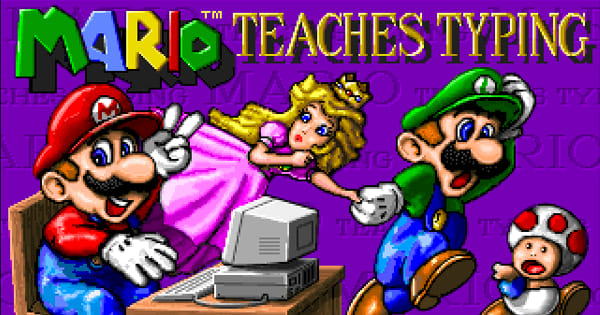
Mario Teaches Typing is an educational typing-tutor game released in the early 1990s for MS-DOS and other platforms, using Nintendo's beloved Mario characters to teach keyboard skills. Designed to make learning to type fun for children (and beginners of any age), it presents typing lessons and exercises in the form of Mario-themed mini-games, where pressing the correct keys causes Mario (or Luigi, or the Princess) to run, jump, and interact with the familiar Mushroom Kingdom world on screen.
Mario Teaches Typing is fondly remembered as a friendly, effective way to learn touch typing. Rather than dry drills, it gamifies the process: as you type the prompted letters and words accurately, your on-screen character progresses through levels, stomping enemies and clearing obstacles, turning practice into play. It includes structured lessons that build from individual keys to full words and sentences, along with skill tracking and adjustable difficulty. By combining genuine typing instruction with the appeal of Mario, it helped many players develop real keyboard skills, and it remains a nostalgic educational classic.
How the Game Works / Gameplay Basics
The game teaches typing through a series of lessons and mini-games. You start with the basics — finger placement on the home row and individual keys — and progress through exercises that gradually introduce more letters, then words and full sentences. In the Mario-themed game modes, the action on screen is driven entirely by your typing: when you press the correct key at the right moment, Mario runs forward, jumps over gaps, or stomps a Goomba, so accurate, well-timed typing literally moves the game along.
The focus is on building proper technique, accuracy, and speed over time. The game tracks your performance — words per minute, accuracy percentage — and offers adjustable difficulty so it suits both complete beginners and those looking to get faster. Because mistakes interrupt Mario's progress, you're naturally encouraged to type carefully and develop good habits rather than just mashing keys. Structured, gentle, and rewarding, it makes the repetitive work of learning to type genuinely enjoyable, especially for younger players drawn in by the Mario characters and world.
Beginner Tips
- Use the home row. Keep your fingers on the proper resting keys for good technique.
- Prioritize accuracy. Type correctly first; speed comes naturally with practice.
- Don't look down. Try to keep your eyes on the screen, not the keyboard.
- Work through the lessons. Follow the structured order from keys to words to sentences.
- Practice regularly. Short, frequent sessions build typing skill best.
- Adjust the difficulty. Match the level to your current ability and raise it as you improve.
Why Play Mario Teaches Typing Online?
Typing practice works best in short bursts, and this is a version you can reach in the ten minutes before dinner without hunting down a lesson disk or sitting through an installer. Open the tab, run one lesson, close it again.
Nothing is written to the machine you happen to be borrowing, which makes it as usable on a school library PC or a work laptop as on your own desk. For a child meeting the keyboard for the first time, the gap between deciding to practise and actually practising is about two seconds wide — and with Mario waiting on the other side of it, that matters more than any lesson plan.
Troubleshooting
- Game won't start? Give the lesson menu a moment to finish drawing before you touch the keyboard — anything typed while it is still coming up goes nowhere. A page refresh restarts the load cleanly.
- Keyboard not responding? Put focus on the frame with a click. This is a game made entirely of keystrokes, so it needs focus before a single letter counts.
- Text hard to read? Use fullscreen. The prompts you are meant to be reading are small at default size, and the whole point is to keep your eyes on the screen rather than your hands.
- Running slowly? Quit anything heavy running alongside the browser. Mario reacts to each keystroke as you make it, and input lag is the one thing here that will teach you bad timing.
- No sound? Make sure nothing is muted and the volume is audible. The audio cue for a mistyped key is the fastest feedback the game gives you, so it's worth having.
- Struggling to keep up? Lower the difficulty and focus on accuracy before speed.
Frequently Asked Questions
Is Mario Teaches Typing free to play online? Yes. This was courseware once — a box on a shop shelf, bought for a child who needed to learn the keyboard. Every lesson in it costs nothing here, and you are never asked for a payment.
Do I need to install a typing program or an emulator? No. The whole tutor runs from this page, with no installer and no account to set up.
Can I play Mario Teaches Typing on mobile? You can load it, but consider what the program is actually teaching: eight fingers resting on the home row, eyes off your hands. A phone offers two thumbs and an on-screen keyboard that covers half of Mario, so none of the technique survives the trip.
What kind of game is Mario Teaches Typing? It's an educational typing tutor that teaches keyboard skills through Mario-themed lessons and mini-games.
Is it good for kids? Yes, it's designed to make learning to type fun and approachable, especially for younger players.
Can I save my progress? The game tracks your typing progress and lessons as you play, so you can build your skills over time.
The Mushroom Kingdom and faster typing await. Load it up and start practicing with Mario.