
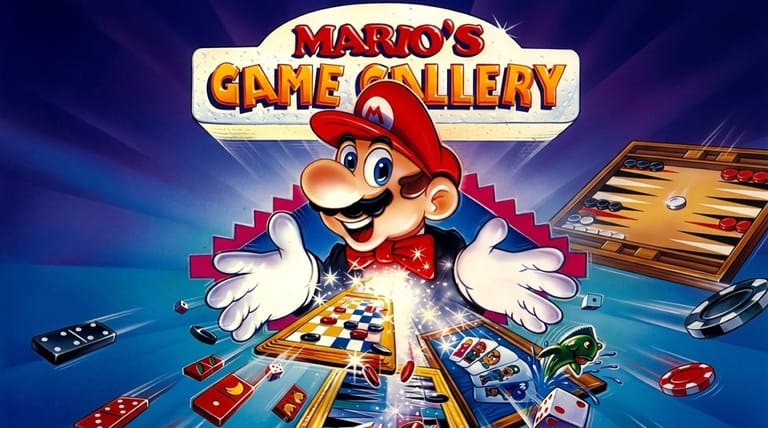

Mario's Game Gallery
Preparing game…
Mario's Game Gallery
Play classic board and card games against a chatty, animated Mario in this charming family collection. Mario's Game Gallery shipped in 1995 on a disc that had to stay in the drive for Mario to say a word; here the whole set opens in a browser tab, costs nothing, and asks for no account. Five tabletop games come with it, and Mario hosts, plays and heckles his way through all of them. A phone screen can show a board well enough, but backgammon points and domino tiles were laid out for a mouse pointer rather than a fingertip.
How to Play Mario's Game Gallery Online
Getting started takes seconds:
- Hit Play above to start the gallery loading.
- Give it a few seconds, since Mario's recorded voice lines come along with the games themselves.
- Click inside the game frame so your clicks land on the board rather than on the page around it.
- Choose one of the games from the gallery menu.
- Play against Mario, who comments on the action as you go.
Each game in the gallery has its own simple rules — pick one you know, or learn a new one as Mario guides you along.
Controls
Mario's Game Gallery is played with the mouse, across several classic games:
| Action | Control |
|---|---|
| Select a game | Click it in the gallery menu |
| Make a move | Click the board, card, or piece |
| Confirm action | Click |
| Choose options / difficulty | Use the on-screen menus |
| Return to gallery | Use the menu |
| Fullscreen toggle | Right Alt + Enter |
Each game uses simple point-and-click moves — click your piece or card and where you want it to go, and Mario will take his turn in response.
What Is Mario's Game Gallery?
Mario's Game Gallery is a collection of classic tabletop games developed by Presage Software and released in 1995 for MS-DOS and other platforms (later re-released as Mario's FUNdamentals). It brings together five well-known board and card games — including Checkers, Backgammon, Go Fish, Dominoes, and Yacht (a dice game similar to Yahtzee) — and lets you play them against Mario himself, who serves as your animated, talking opponent and host, complete with plenty of voiced commentary and personality.
Mario's Game Gallery is fondly remembered as a friendly, family-oriented compilation that made traditional games approachable and fun, especially for younger players. Its standout feature was Mario's digitized voice and animation — he reacts to moves, teases, congratulates, and chats throughout, giving the familiar games a lively, charming character. With easy-to-learn rules, adjustable difficulty, and the appeal of playing against a beloved gaming icon, it offered relaxed, accessible entertainment. It remains a nostalgic and pleasant collection for anyone who enjoys classic games with a Nintendo twist.
How the Game Works / Gameplay Basics
From the main gallery menu, you choose which of the five classic games you'd like to play, then face off against Mario as your opponent. Each game follows its own standard rules — moving and jumping pieces in Checkers, bearing off in Backgammon, matching and asking in Go Fish, laying tiles in Dominoes, and rolling for combinations in the dice game — all controlled with simple point-and-click input. Mario takes his turns automatically, reacting to the state of play with voiced comments and animations.
The collection is built for accessible, casual fun rather than deep competition. The rules of each game are easy to pick up, and many versions let you adjust the difficulty of Mario's play to match your skill, so it's welcoming to beginners and children while still enjoyable for anyone who likes a relaxed game. Because the games are self-contained, you can hop between them freely, playing a quick round of checkers one moment and a dice game the next. The main draw is the combination of timeless tabletop gameplay with Mario's charming, chatty presence, making it a warm and pleasant way to enjoy classic games solo.
Beginner Tips
- Start with a game you know. Pick a familiar game to get comfortable with the controls.
- Learn the rules. Try a new game too — they're all easy to pick up.
- Adjust the difficulty. Lower Mario's skill while you're learning a game.
- Take your time. These are relaxed games, so think through your moves.
- Enjoy Mario's comments. His reactions are part of the fun.
- Try them all. Each of the five games offers a different kind of challenge.
Why Play Mario's Game Gallery Online?
A round of dominoes against Mario is a twenty-minute proposition at most, and the old arrangement — find the disc, keep it in the drive, sit through a setup program — cost more time than the game itself did. None of that applies here. The gallery menu is one click away and you can be rolling dice inside a minute.
That suits a collection built for dipping into. Nothing lands on the hard drive of whatever machine you happen to be sitting at, so the games travel with you, and anyone who has never heard Mario read out a Go Fish request can meet him without somebody first hunting through a shelf of CD cases.
Troubleshooting
- Game won't start? All five games arrive as a single package, so the gallery menu takes a moment to appear — let it finish rather than clicking into empty space. A refresh restarts the load if it stalls.
- Mouse or keyboard not responding? Click once on the game area. Every move in every game here is a mouse click, so nothing registers until the frame has focus.
- Board hard to see? Use fullscreen. Backgammon and dominoes in particular put a lot of small pieces on screen, and the extra size makes them far easier to read.
- Running slowly? Close spare tabs and demanding applications. Mario's animated reactions between turns are the part that stutters first on a busy machine.
- No sound? Look for a mute marker on the browser tab, then check the system volume. Mario's recorded commentary is most of what separates this from any other checkers program, so it is worth chasing down.
- Unsure of the rules? Start on an easy difficulty and learn as you play.
Frequently Asked Questions
Is Mario's Game Gallery free to play online? Yes. Presage's collection sold as a boxed CD-ROM in 1995, and none of that price carries over — all five games are open to you here at no cost.
Is any installation needed to play the gallery? No. All five games run inside this page, with nothing to download and no account required.
Can I play Mario's Game Gallery on mobile? You can, though the games ask for precise clicks: picking one backgammon point out of twenty-four, or dropping a domino on the correct end of a growing line. Those are cursor-sized targets, and a fingertip on a small screen will keep catching the one next door.
What games are included? It features classic games like Checkers, Backgammon, Go Fish, Dominoes, and a Yahtzee-style dice game.
Who do you play against? You play against Mario himself, who acts as an animated, talking opponent and host.
Can I save my progress? Each game is a single sitting rather than part of anything longer, so finish your checkers match or your dice round and there is nothing left over to store.
A gallery of classic games and a chatty Mario await. Load it up and pick a game.